Development
Pythonic Functional Programming Libraries
The pythonic-fp PyPI project itself is a support component of the Pythonic FP libraries.
Claims the pythonic-fp name on PyPI for the overall effort
Provides integration tests for the Pythonic FP projects
PyPI project for the pythonic-fp homepage on GitHub pages
Homepage provides links to the
PyPI projects making up the Pythonic FP effort
GitHub Repos for each project
Used for Pythonic FP library integration tests.
Provides locations for overarching CHANGELOG and README files.
Each Pythonic FP project has its on CHANGELOG and README files.
Tip
There is no reason to install pythonic-fp itself into your Python environment.
Development Practices
The only supported version of the Pythonic FP projects will be the ones with the same top level major release numbers.
Documentation for each Pythonic FP project will be generated on GH-Pages for the current and previous top level PyPI releases.
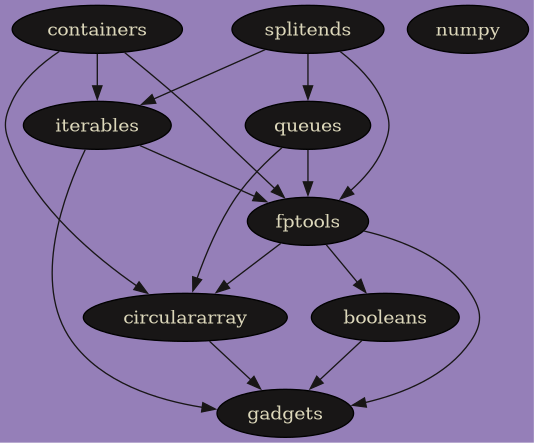
Module Dependencies
All non-typing related dependencies. Arrows point from modules to their dependencies.
Internal to Pythonic FP
Dependencies between the Pythonic FP projects.
External to Pythonic FP
All Python external dependencies, except for typing related standard library dependencies.

Semantic Versioning and Rolling Releases
For the individual projects strict 3 digit semantic versioning has been adopted, see semantic versioning and to avoid putting caps on dependencies for library modules. Sometimes caps are necessary to prevent API changes from leaking back to prior releases. No caps are used for external dependencies.
To accomplish this, a series of rolling releases >=X.0.0,<X+1 for
each Pythonic FP project will be used. The overall effort, pythonic-fp,
will also use the same three digit semantic versioning.
MAJOR for incompatible API changes across the projects
MINOR for backward compatible added functionality
PATCH incremented for backward compatible bug fixes
All projects libraries and the overall effort will share the same
MAJOR release number to indicate a rolling release series.
Changes in MAJOR will provide opportunities for breaking API changes
based on lessons learned from library use. The current rolling release
started at 6.0.0.
This allows for more package management flexibility for software developers using these libraries, and provides easier access to the latest features.
Changelog
Pythonic FP overarching CHANGELOG.
Each individual Pythonic FP project has its own CHANGELOG too.
Test suites
Pytest based test suites are provided for unit and integration tests. Each project has its own pytest based unit test suite. Integrated tests are provided by the pythonic-fp project itself.
Any necessary dependency changes are made in pyproject.toml.
Unit test example
Test one project locally.
Clone the Pythonic FP fptools GitHub repo and its dependency repos in the same parent directory.
grscheller/pythonic-fp-fptools
grscheller/pythonic-fp-booleans
grscheller/pythonic-fp-circulararray
grscheller/pythonic-fp-gadgets
Then,
$ cd pythonic-fp-fptools/
$ uv lock --upgrade
$ uv sync --group test
$ uv run pytest
Integration tests
Clone the grscheller/pythonic-fp GitHub repo and all the Pythonic FP projects all in the same parent directory.
$ cd pythonic-fp/
$ uv lock --upgrade
$ uv sync --group test
$ uv run pytest
Building documentation
Both the Pythonic FP homepage and documentation for each project are automatically built with GitHub actions on pushing to GitHub. Documentation for the latest release and the next release currently in development is built.
The Sphinx based documentation can also be built locally.
Build development docs locally
Clone say the grscheller/pythonic-fp-fptools repo. Release
information needs to be updated in docs/Makefile.
$ cd pythonic-fp-fptools
$ uv lock --upgrade
$ uv sync --group docs
$ cd docs/
$ uv run make devel
Docs are built in docs/build/html.
Build homepage locally
Documentation builds use Sphinx from the docs dependency group. The
simplest way to build locally is using uv to manage your python
environments. Any environment with the docs group installed will
work; make will error out if sphinx-build is not on the PATH.
Clone grscheller/pythonic-fp.
$ cd pythonic-fp
$ uv lock --upgrade
$ uv sync --group docs
$ cd docs/
$ uv run make homepage
The homepage is built in docs/build/.
View docs locally
To view either the development docs or Pythonic FP homepage.
from docs/ directory:
$ python -m http.server 8080 -d buildgo to in browser:
http://localhost:8080/